
Learn how to boost Shopify sales with custom cart and checkout code: sticky cart drawers, discount logic, upsell prompts, and dynamic delivery estimates. Step-by-step Liquid and JS examples included.
Introduction
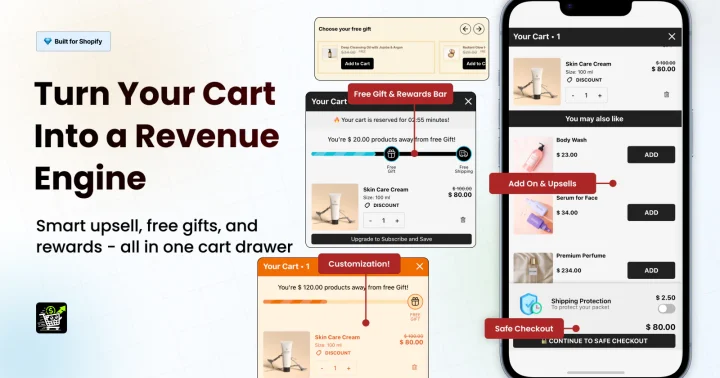
The Shopify checkout process is where visitors turn into paying customers. Even small improvements — like a sticky cart drawer, dynamic discounts, or upsell prompts — can dramatically increase conversion rates.
In this tutorial, you’ll learn custom code tweaks that optimize your cart and checkout experience for higher sales.
🧩 Why Cart & Checkout Optimization Matters
- 🛍️ Reduces Cart Abandonment: Clear, easy-to-use carts keep shoppers moving forward.
- 💰 Boosts Average Order Value (AOV): Upsells, cross-sells, and dynamic discounts encourage bigger orders.
- 📱 Improves Mobile Experience: Sticky and responsive features prevent frustration on small screens.
1️⃣ Add a Sticky Cart Drawer
Allow shoppers to see cart contents without leaving the page.
Code Example:
<div id="cartDrawer" class="cart-drawer">
  <h3>Your Cart</h3>
  <div id="cartItems"></div>
  <button onclick="window.location.href='/cart'">Checkout</button>
</div>

<style>
.cart-drawer {
  position:fixed; top:0; right:0; width:300px; height:100%;
  background:#fff; border-left:1px solid #ccc; padding:20px;
  transform:translateX(100%); transition:transform 0.3s;
  z-index:1000; overflow-y:auto;
}
.cart-drawer.open { transform:translateX(0); }
</style>

<script>
function updateCartDrawer(items){document.getElementById('cartItems').innerHTML=items.join('<br>');}
function toggleCart(){document.getElementById('cartDrawer').classList.toggle('open');}
</script>
✅ Why It Works:
Users can quickly check items and proceed to checkout without page reloads — reduces friction.
2️⃣ Add Discount Logic / Free Shipping Message
Encourage larger orders by displaying dynamic offers.
Code Example:
{% assign free_shipping_threshold = 50 %}
{% if cart.total_price < free_shipping_threshold | times: 100 %}
  <p>Add ${{ free_shipping_threshold | minus: cart.total_price | divided_by: 100 }} more to get free shipping!</p>
{% else %}
  <p>🎉 You qualify for free shipping!</p>
{% endif %}
✅ Why It Works:
Prompts customers to add more items to reach free shipping, increasing AOV.
3️⃣ Upsell Prompt on Cart Page
Suggest related products before checkout.
Code Example:
<h4>You May Also Like</h4>
<div class="related-products">
  {% for product in collections['featured-products'].products limit:3 %}
    <div class="related-item">
      <a href="{{ product.url }}">{{ product.title }}</a>
      <p>${{ product.price | money }}</p>
    </div>
  {% endfor %}
</div>
✅ Why It Works:
Cross-selling increases order value and exposes shoppers to more products.
4️⃣ Show Estimated Delivery Date
Help customers know when they’ll receive items.
Code Example:
const deliveryEl = document.getElementById('deliveryDate');
const today = new Date();
const delivery = new Date();
delivery.setDate(today.getDate() + 5);
deliveryEl.textContent = "Estimated delivery: " + delivery.toDateString();
✅ Why It Works:
Adds trust and reduces hesitation during checkout.
5️⃣ Enable Cart Item Quantity Updates Without Reload
Allow users to update quantities directly in the cart.
Code Example:
document.querySelectorAll('.cart-quantity').forEach(input=>{
  input.addEventListener('change',()=>{
    const line = input.dataset.line;
    fetch('/cart/change.js', {
      method:'POST',
      headers:{'Content-Type':'application/json'},
      body: JSON.stringify({line:line, quantity:input.value})
    }).then(()=>location.reload());
  });
});
✅ Why It Works:
Reduces friction for bulk orders and improves user experience.
🧠 Pro Tip: Combine Features for Maximum Impact
A sticky cart drawer + free shipping alerts + upsells = a high-converting checkout experience. Test each feature individually and monitor analytics to see the lift in conversions.
💬 Real-World Example: Packaging Websites
For businesses like Discount Box Printing or Packaging Vista:
- Show free shipping based on order volume for custom boxes.
- Upsell complementary items (tissue paper, inserts, or custom printing).
- Use estimated delivery dates for bulk packaging orders.
This reduces friction for B2B and eCommerce clients alike.
Previous: Boost Conversions with Shopify Product Page Enhancements